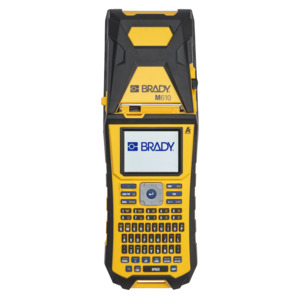

Brady M610 Label Maker, Handheld, 300 dpi, Single Color, 2" Tape
Our Part #10144410
Condition:New
Mfr Part #M610
- Description
- Specifications
- Documents
- Design and print labels using a keypad or desktop software
- Work longer with an enhanced Gen3 Li-ION battery - print 4,500 labels on a full charge
- Easily import and export label files, lists and graphics to the printer through USB 2.0 port (Type A and B) or USB flash drive
- Print labels at 2" per second print speed
- Get added durability with a printer that is resistant to military-grade shocks (MIL-STD-810G) and 6-foot drops
- -115°F temperatures
Get the durability your work demands
Do more with enhanced capabilities like military-grade shock resistance, below-freezing operating temps and the widest range of data entry options. Plus, print up to 4,500 labels on a full charge. It has a manual cut type and a battery capacity of 2700mAh. It has a power supply voltage of 110 - 240V. It prints a maximum of 750 labels per day with a print speed of 2.0" per second and it has a 300 dpi resolution. It has a minimum label length of 0.236". It has on-screen indicators such as battery life, ribbon and label part number recognition, ribbon remaining and supply remaining. It is compatible with Android devices with Android OS 5+, iPhone 5S or newer with iOS 10+.
More data entry options
Get more ways to save and store labels on board - import data files from a USB thumb drive, import and save files, lists and graphics, or design and print labels using a keypad or desktop software.
Better printing
Print better and faster with 2” per second print speed to print text, barcodes, shapes and images. Get an enhanced Gen3 Li-ION battery for non-stop printing.
Greater label selection
Select the best label for every job - choose from over 50 material types and 900+ label parts, including continuous tapes and pre-sized labels. Available in stock cartridges, bulk boxes and custom labels created to your specs.
Application
Asset Tracking, Circuit Board Labeling, Data and Telecommunications Labeling, Electrical Labeling, Facility Identification, General Identification, Safety Identification, Wire and Cable Labeling.
Label Material Types
FreezerBondz Polyester, Heat-shrink Polyolefin, High-Temperature Heat-shrink Polyvinylidene Fluoride Sleeve, Metallized Polyester, Metallized Polyester with Polyester Overlaminate, Nylon Cloth, Paper, Polyester, Polyethylene, Polyethylene Foam Laminate Polyester, Polyimide, Polyolefin, Polypropylene, Polyvinyl fluoride, Reflective Tape, Self-laminating Polyester, Self-laminating Vinyl, StainerBondz Polyester, Static Dissipative Polyester, Tamper-evident Metallized Polyester, Tamper-evident Polyester, Tamper-resistant Metallized Vinyl, Tamper-resistant Vinyl, Vinyl, Vinyl Cloth.
Languages Available
Bulgarian, Croatian, Czech, Danish, Dutch, English (US), Estonian, Finnish, French (France), German, Hungarian, Italian, Norwegian, Polish, Portuguese (Portugal), Romanian, Russian, Slovak, Slovenian, Spanish (Spain), Swedish, Turkish
Frequently Asked Questions
How do I know which labels I can use with the M610?
This printer requires Brady Authentic labels. They are easily recognizable with the Brady Authentic logo on the carton. The labels begin with the prefix M6, M6C, BM- or BMC. Brady Authentic label rolls have bi-directional communication, which establishes the correct printer and software settings for optimal label performance and creation.
Can I use my legacy BMP61 label cartridges in my M610 printer?
No. The M610 printer requires Brady Authentic labels that have catalog numbers beginning with the prefix M6, M6C, BM- or BMC.
How do I connect my M610 printer to the Express Labels app?
Use Bluetooth to connect your printer to any phone or tablet that supports Bluetooth 4.2 or newer. Simply install the app, power on your printer, then open Express Labels. The M610 will appear as an available printer. The Bluetooth range is up to 65 feet (19.8 meters).
What type of labels are available for my M610 printer?
There are over 50 material options including: All-Weather, Electrostatic Dissipative, Flag, Sleeve, High Heat, Laboratory, Metallized, Multi-Purpose, Paper, Raised Panel, Tag, Tamper Evident and Wrap labels.
What routine maintenance should be done?
Routine maintenance includes: upgrading firmware, updating printer label library values, cleaning the printer, replacing the printer cover and recycling the label and ribbon cartridge.